Mulled Wine Temperature Tracker
Monitoring and maintaining a precise temperature is crucial when preparing mulled wine to preserve its rich flavors, aromas, and alcohol content without boiling away its core characteristics. This article presents a comprehensive thermal analysis and monitoring overview of an automated mulled wine boiler system, utilizing logged data collected between October 11 and October 13, 2026
Building a Climate-Controlled Fermentation Chamber for 3 Demijohns
Creating a temperature-controlled fermentation chamber is one of the best ways to ensure consistent, high-quality results when making wine or cider. By combining rigid XPS (Extruded Polystyrene) insulation boards, an efficient carbon heating foil, and a smart Raspberry Pi Pico W controller, you can build a precise, energy-efficient enclosure tailored to hold 3 demijohns.
Key Components Needed
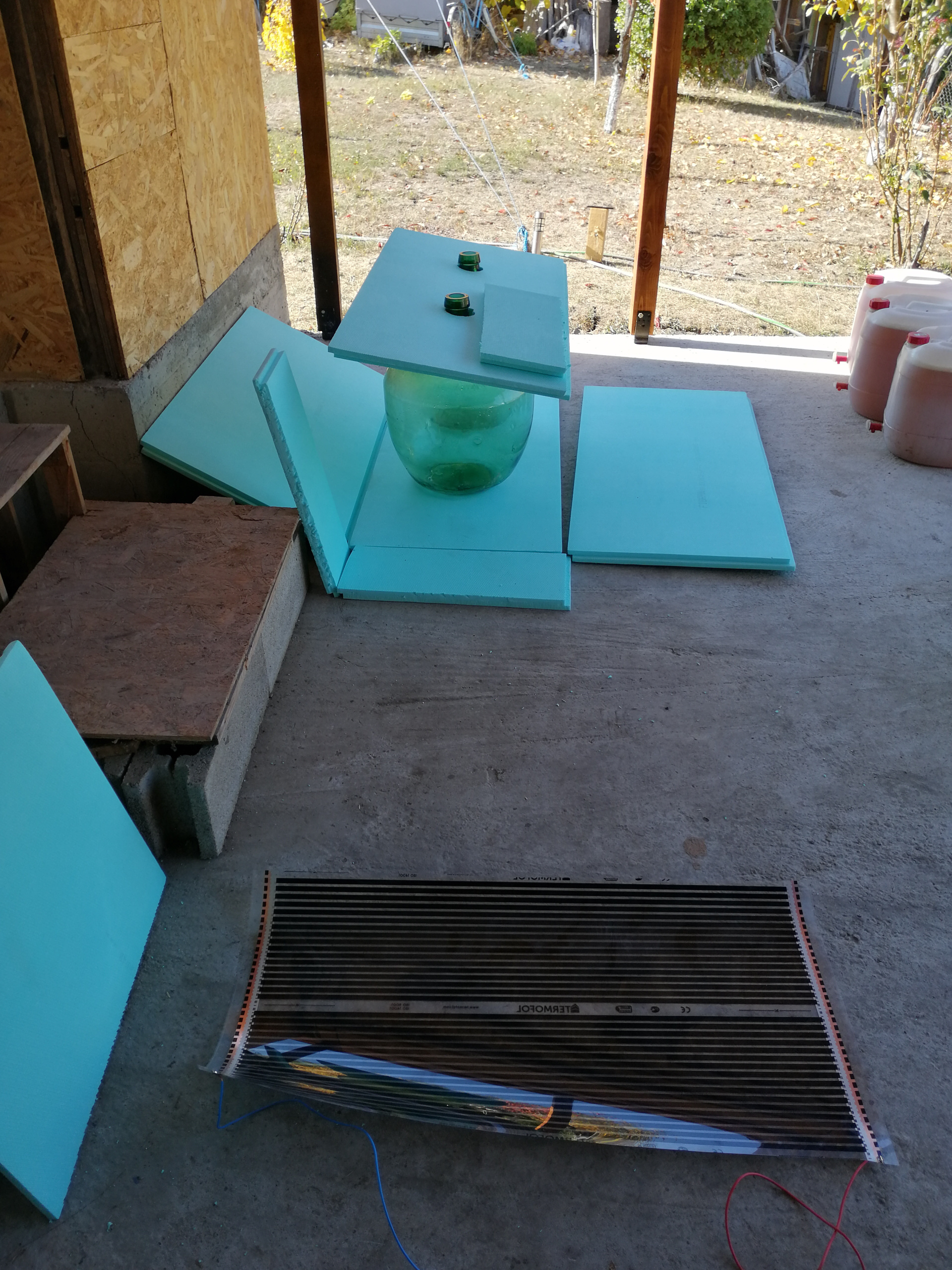
XPS Insulation Boards:
Extruded polystyrene offers fantastic thermal insulation, is lightweight, rigid, and resistant to moisture. Thicknesses of 30mm to 50mm work best.
Temperature Sensor, DS18B20
For accurate, real-time temperature readings inside the chamber.
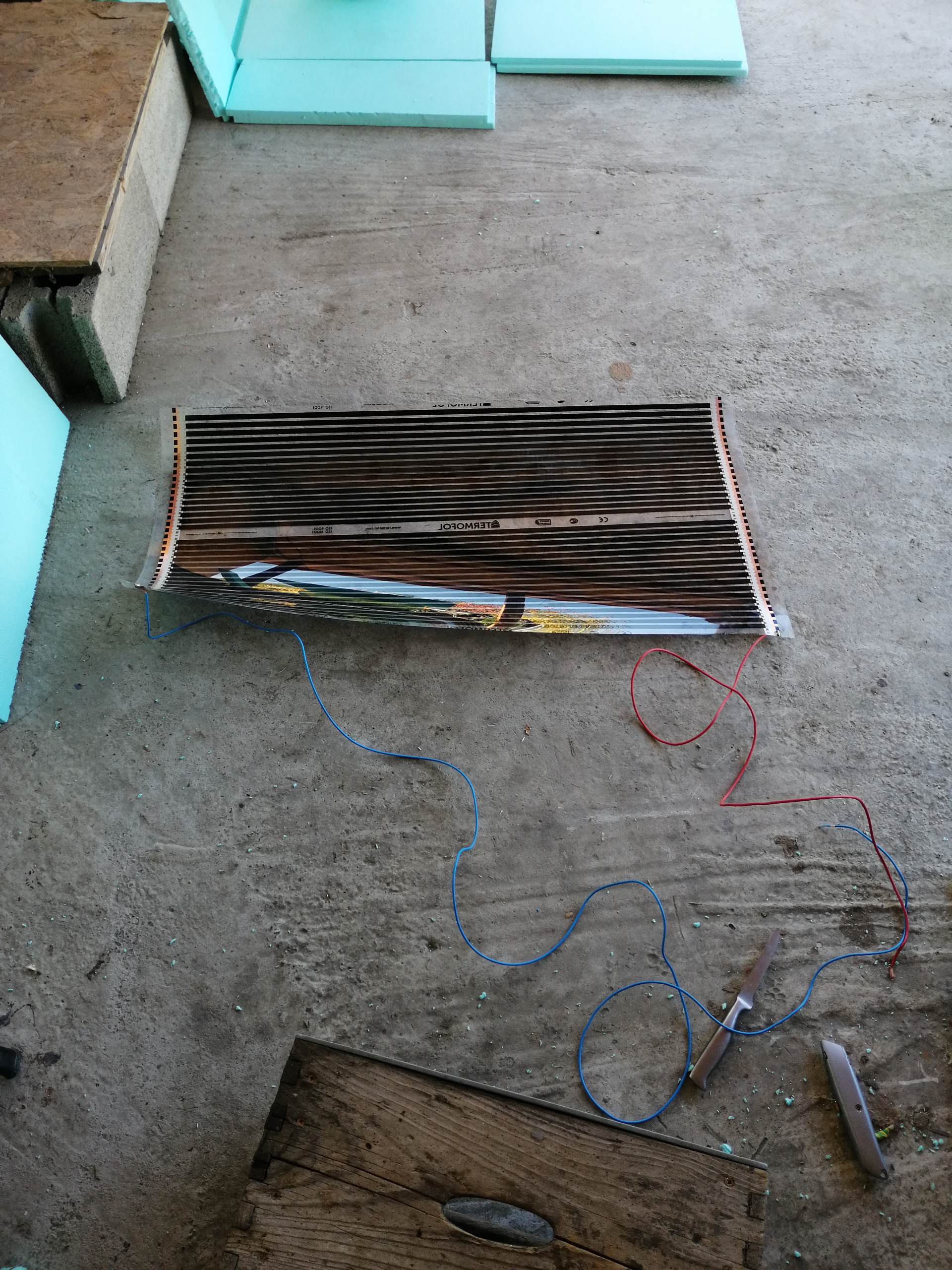
Carbon Heating Foil:
A thin, flexible heating element that provides even radiant heat distribution without hot spots, perfect for gentle enclosure warming.
Relay Module / Solid State Relay (SSR):
To safely switch the power to the carbon heating foil via the Pico W.
Raspberry Pi Pico W:
A versatile microcontroller with built-in Wi-Fi, allowing you to monitor and adjust temperatures remotely.
Adhesives:
Polyurethane foam glue or specialized construction adhesive safe for XPS.
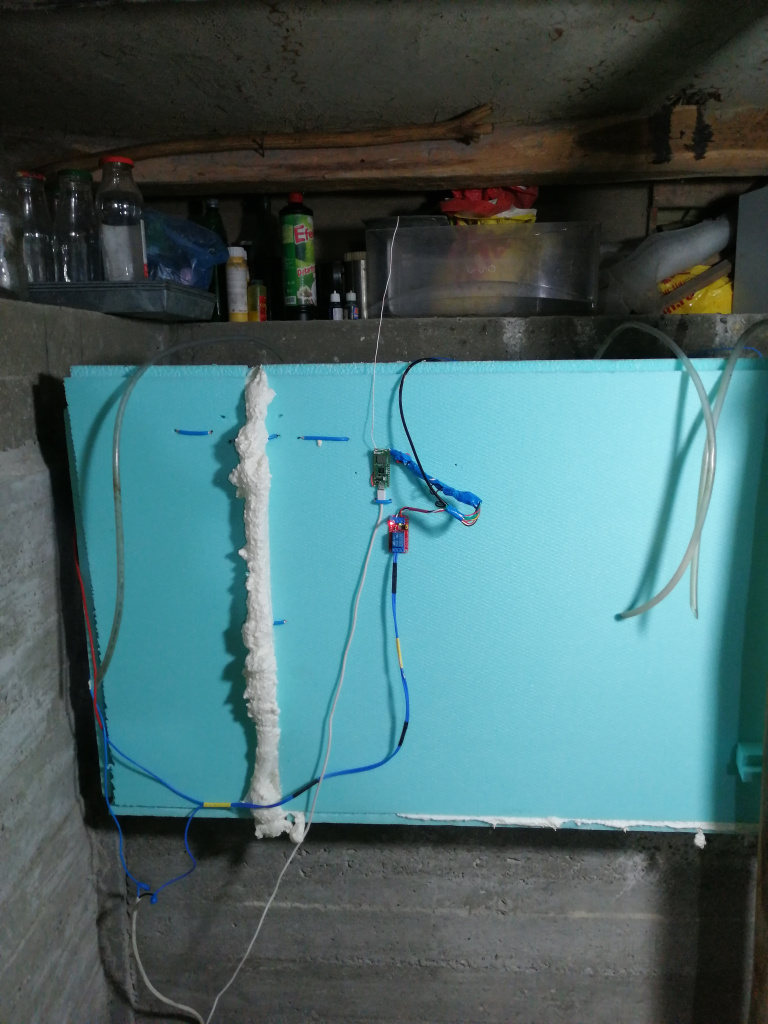
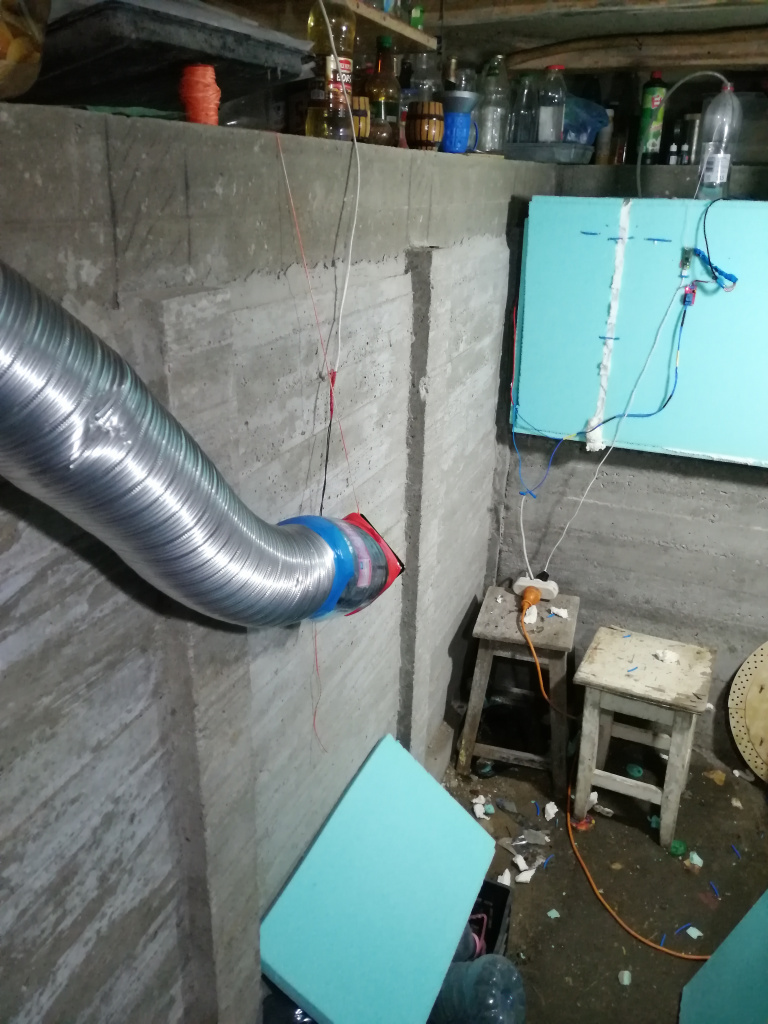
Step-by-Step Build Overview
1. Designing and Building the XPS Box
Dimensions: Measure your 3 demijohns (including airlocks) and add clearance for air circulation and wiring. Design a rectangular box with a removable top lid or a front-access door.
Cutting: Score and cut the XPS boards cleanly using a utility knife or hot wire cutter.
Assembly: Glue the base, side walls, and back panel together using polyurethane adhesive or foam gun glue. Reinforce the corners with tape or interlocking joints. Ensure a tight seal to maximize thermal efficiency.
2. Installing the Carbon Heating Foil
Placement: Position the carbon heating foil on the bottom floor or along the inner back wall of the box. Placing it at the bottom allows warm air to rise naturally around the demijohns. I put it on inner back wall.
Protection: Cover or insulate the foil appropriately according to manufacturer guidelines to prevent direct, abrasive contact with the glass demijohns.
Wiring: Connect the heating foil securely to a relay module controlled safely by the low-voltage side of your electronics setup.
3. Setting Up the Raspberry Pi Pico W Control Unit
Sensor Placement: Mount the temperature sensor inside the box at the same height as the middle of the demijohns for an accurate reading of the fermenting liquid’s environment.
Microcontroller Logic: Program the Raspberry Pi Pico W (using MicroPython or C/C++) to read the sensor data continuously. Set your target fermentation temperature (e.g., matching your desired wine profile).
Smart Automation: Implement a thermostat control loop (such as PID or simple hysteresis/bang-bang control) to trigger the relay and turn on the heating foil whenever the internal temperature drops below the target threshold.
Wi-Fi Connectivity: Leverage the Pico W’s built-in Wi-Fi to log temperature telemetry or send alerts to your smartphone or home dashboard.
4. Final Assembly and Testing
Seal Check: Place your 3 demijohns inside, close the lid/door, and run a dry test for 24 hours.
Calibration: Monitor how quickly the carbon heating foil warms the space and ensure the Pico W maintains a stable temperature without overshooting.

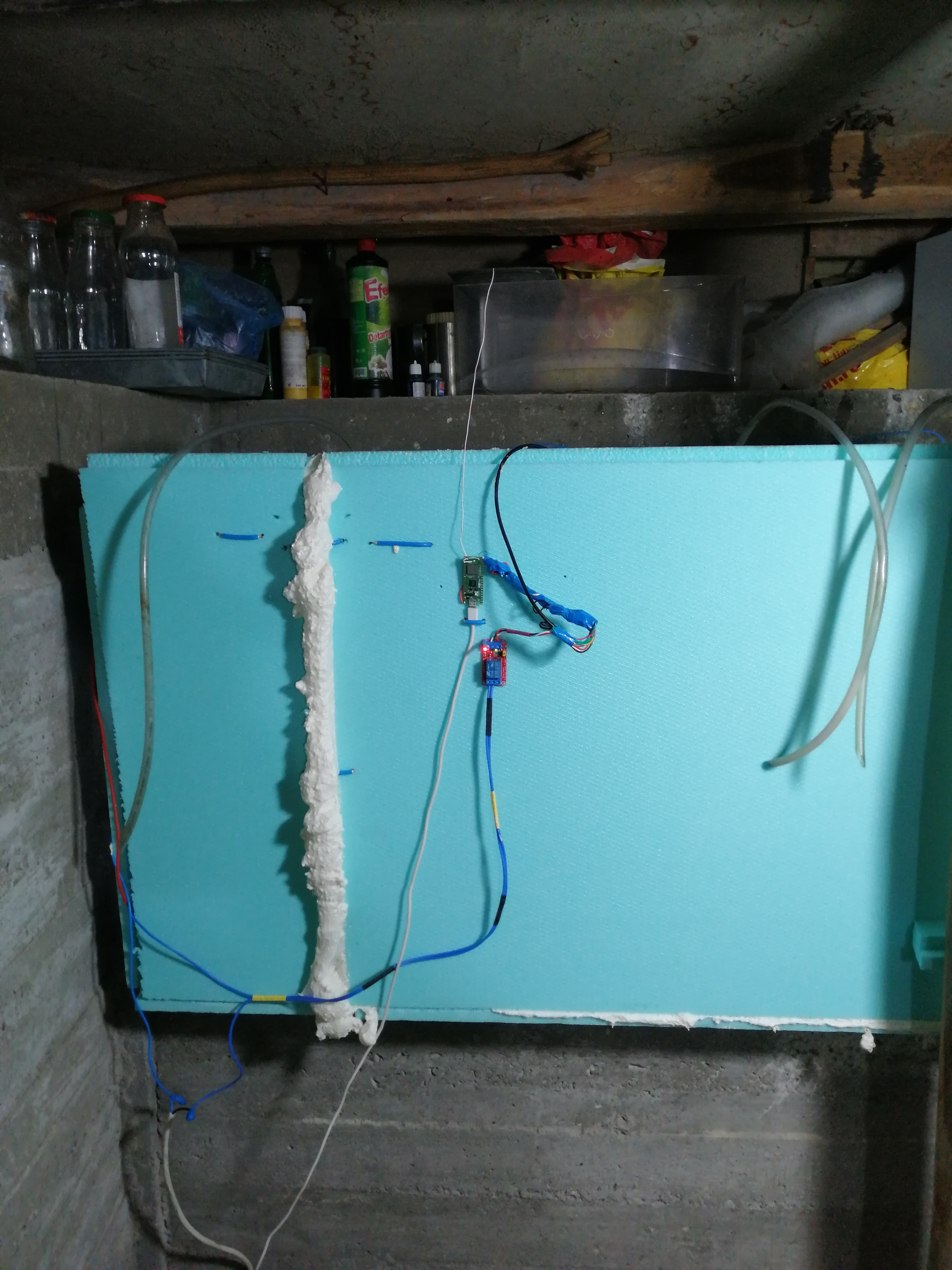
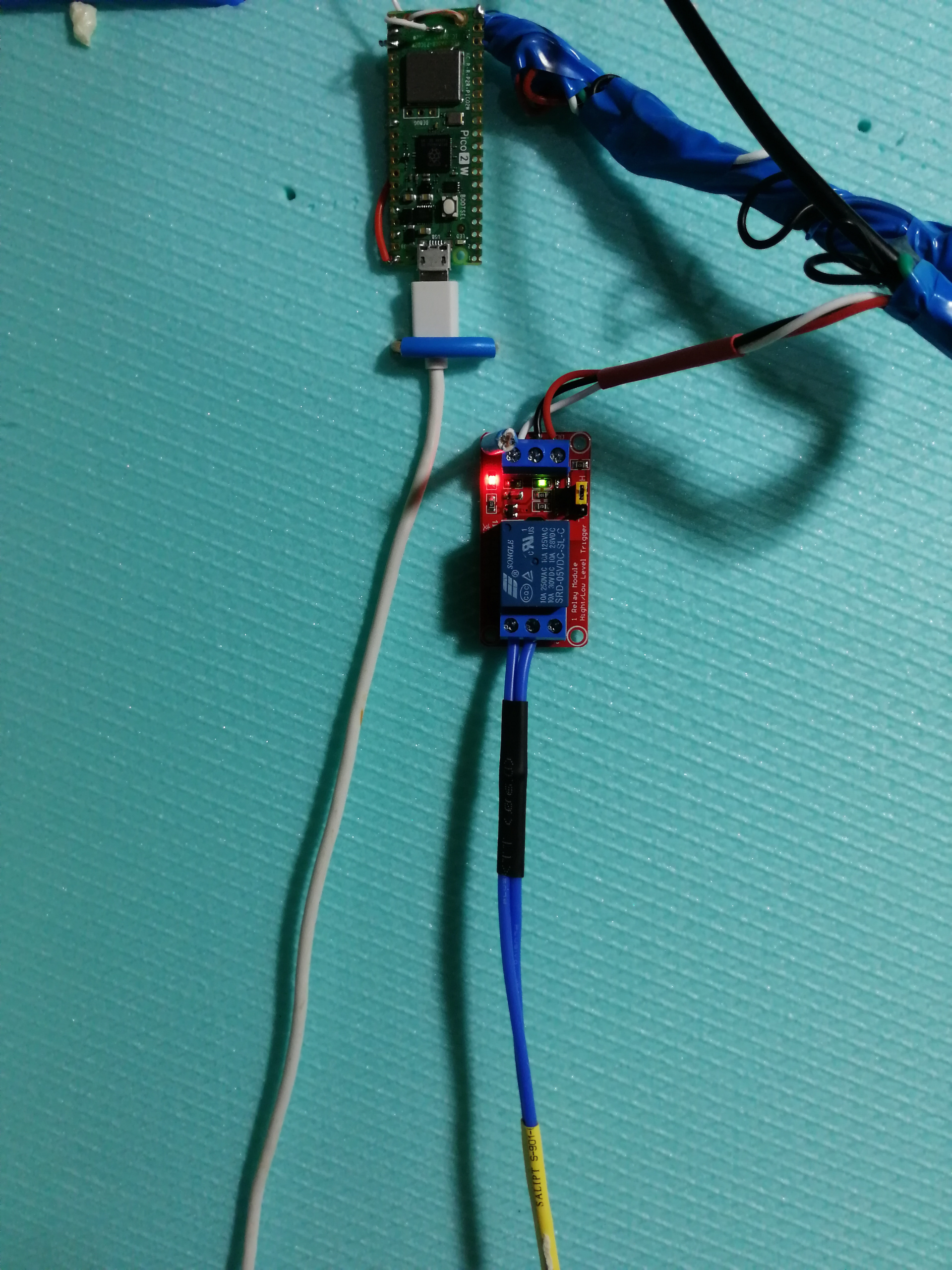
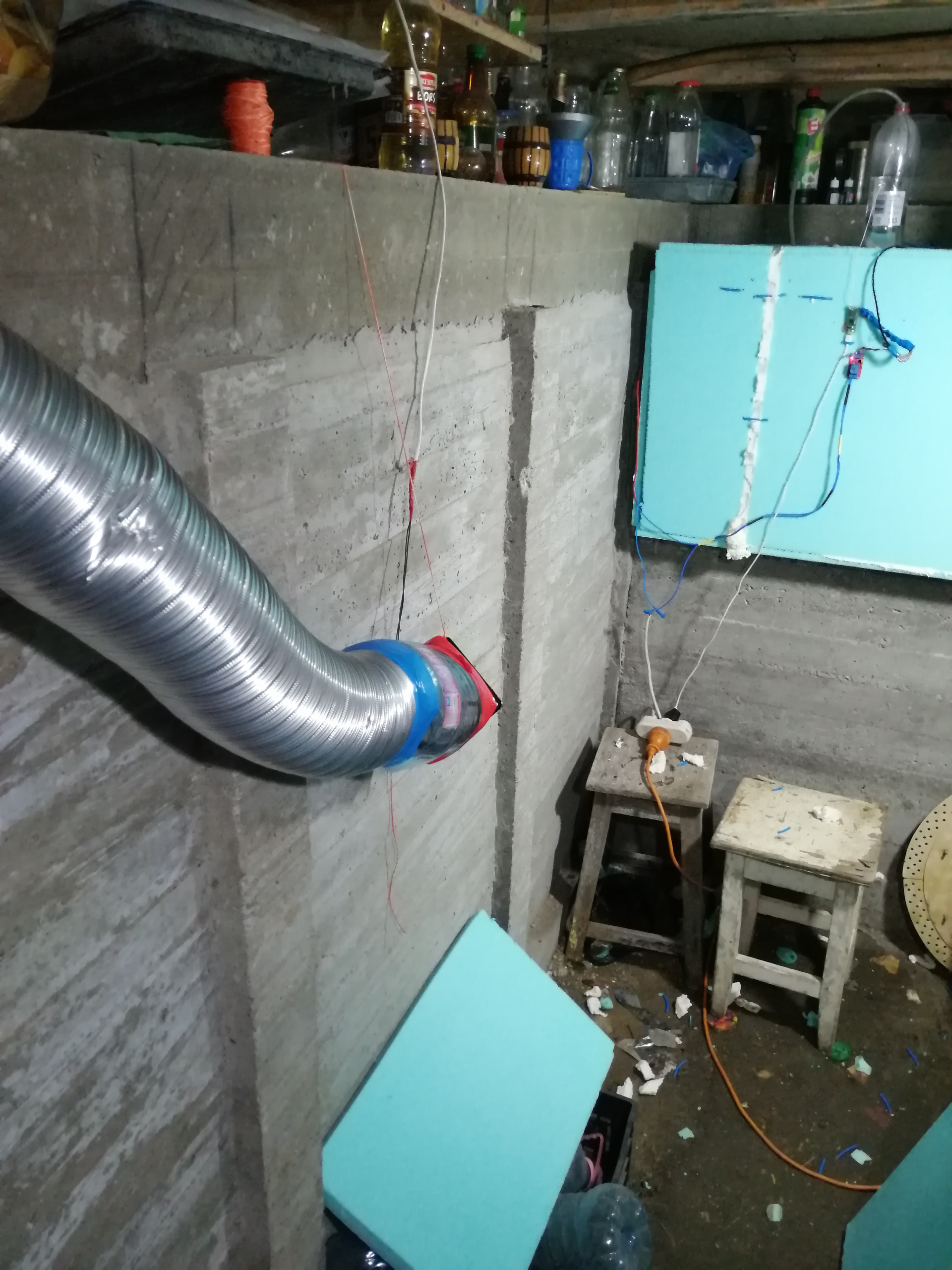
Benefits of This Setup
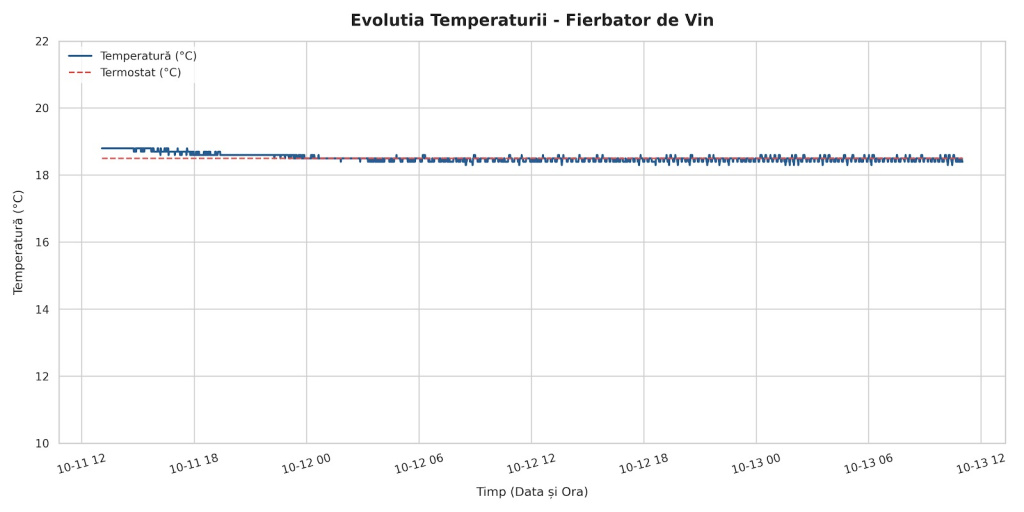
Precision:
Keeps your fermentation temperatures locked in, preventing unwanted off-flavors caused by thermal swings.
Efficiency:
XPS insulation ensures minimal energy usage, while the carbon foil distributes warmth evenly.
Smart Control:
he Raspberry Pi Pico W gives you modern remote visibility over your brewing process right from your network.
Code required
Pico 2 W code - it will produce a JSON format in HTML
This Raspberry Pi Pico 2 W is connected to a relay module, so it can start stop a 230V A.C. heating element
import network, socket, time, machine, onewire, ds18x20, json
from secrets import secrets

# --- 1. POWER STABILIZATION ---
led = machine.Pin("LED", machine.Pin.OUT)
led.off()
time.sleep(5)  # Give the 5V adapter 5 seconds to settle

# --- 2. HEATER FIRST, FORCED OFF ---
HEATER_PIN = 15
heater_pin = machine.Pin(HEATER_PIN, machine.Pin.OUT)
heater_pin.low()

# --- 3. SETTINGS ---
termostat = 18.5
HYST = 0.3                 # heater ON below (termostat - HYST), OFF at termostat
READ_INTERVAL_MS = 1000    # how often the control loop reads the sensor
WIFI_RETRY_MS = 3000      # how often to retry WiFi when disconnected

SENSOR_MAP = {
    'fierbator': '28833c949704036c',
}

# Shared state: updated by the control loop, served by HTTP
state = {"fierbator": None, "heater": "oprit", "termostat": termostat}

# --- 4. WIFI (non-blocking after startup) ---
wlan = network.WLAN(network.STA_IF)
wlan.active(True)
wlan.config(pm=0xa11140)

def start_wifi():
    print("Connecting WiFi...")
    try:
        wlan.connect(secrets['ssid'], secrets['password'])
    except OSError:
        pass

start_wifi()
t0 = time.ticks_ms()
while not wlan.isconnected() and time.ticks_diff(time.ticks_ms(), t0) < 15000:
    led.toggle()
    time.sleep(0.5)
led.on() if wlan.isconnected() else led.off()
print("WiFi ready" if wlan.isconnected() else "WiFi not yet connected, continuing anyway")

last_wifi_try = time.ticks_ms()
wifi_fail_count = 0

def wifi_step():
    """Called every loop. Never blocks; retries in the background."""
    global last_wifi_try, wifi_fail_count
    if wlan.isconnected():
        wifi_fail_count = 0
        return
    now = time.ticks_ms()
    if time.ticks_diff(now, last_wifi_try) < WIFI_RETRY_MS:
        return
    last_wifi_try = now
    wifi_fail_count += 1
    if wifi_fail_count % 3 == 0:  # every ~30s, hard reset the radio
        wlan.active(False)
        time.sleep_ms(200)
        wlan.active(True)
        wlan.config(pm=0xa11140)
    start_wifi()

# --- 5. SENSOR + THERMOSTAT (runs on its own, no HTTP needed) ---
ds_sensor = ds18x20.DS18X20(onewire.OneWire(machine.Pin(22)))

converting = False
t_convert = 0
t_last_read = time.ticks_add(time.ticks_ms(), -READ_INTERVAL_MS)

def heater_off():
    heater_pin.low()
    state["heater"] = "oprit"

def heater_on():
    heater_pin.high()
    state["heater"] = "pornit"

def control_step():
    """Non-blocking: start a conversion, come back 750 ms later to read it."""
    global converting, t_convert, t_last_read
    now = time.ticks_ms()

    if not converting:
        if time.ticks_diff(now, t_last_read) >= READ_INTERVAL_MS:
            try:
                ds_sensor.convert_temp()
                converting = True
                t_convert = now
            except Exception:
                state.pop("fierbator", None)
                state["error"] = "Sensor Bus Busy"
                heater_off()
                t_last_read = now
        return

    if time.ticks_diff(now, t_convert) < 750:
        return

    converting = False
    t_last_read = now
    try:
        roms = ds_sensor.scan()
        found = {''.join(['%02x' % b for b in rom]): rom for rom in roms}
        state.pop("error", None)
        state["termostat"] = termostat

        for name, hex_id in SENSOR_MAP.items():
            if hex_id not in found:
                state[name] = "offline"
                heater_off()
                continue

            t = ds_sensor.read_temp(found[hex_id])
            if t is None or t == 85.0:  # 85.0 = DS18B20 power-on/failed read
                state[name] = "eroare citire"
                heater_off()
                continue

            temp_val = int(t * 10) / 10.0
            state[name] = temp_val

            if temp_val < termostat - HYST:
                heater_on()
            elif temp_val >= termostat:
                heater_off()
            # in between: keep current state (hysteresis)
    except Exception:
        state.pop("fierbator", None)
        state["error"] = "Sensor Bus Busy"
        heater_off()

# --- 6. SERVER (only reports state, never controls the heater) ---
s = socket.socket()
s.setsockopt(socket.SOL_SOCKET, socket.SO_REUSEADDR, 1)
s.bind(('0.0.0.0', 80))
s.listen(5)
s.settimeout(0.1)  # short, so the control loop keeps running

def http_step():
    try:
        conn, addr = s.accept()
    except OSError:
        return
    try:
        conn.settimeout(2)
        led.off()
        request = str(conn.recv(1024))

        if "/reboot" in request:
            heater_off()
            conn.send('HTTP/1.1 200 OK\r\n\r\nRebooting...')
            conn.close()
            time.sleep(1)
            machine.reset()

        conn.send('HTTP/1.1 200 OK\r\nContent-Type: application/json\r\n\r\n')
        conn.send(json.dumps(state))
    except Exception:
        pass
    finally:
        try:
            conn.close()
        except Exception:
            pass
        led.on() if wlan.isconnected() else led.off()

# --- 7. MAIN LOOP ---
while True:
    control_step()
    wifi_step()
    http_step()
SQL data logger - optional
Since Pico will return a JSON response via html requests, those values can be logged for future analisys.
#!/usr/bin/python3

import time
from datetime import datetime
import requests
import mysql.connector

# --- CONFIGURARE BAZĂ DE DATE ---
DB_CONFIG = {
    'host': '192.168.3.19',
    'user': 'undisclosed',        # Înlocuiește cu userul tău MySQL
    'password': 'undisclosed',    # Înlocuiește cu parola ta MySQL
    'database': 'undisclosed',    # Numele bazei de date
    'autocommit': True
}

# Adresa IP a Raspberry Pi Pico (atenție: de obicei Pico folosește http, nu https)
PICO_URL = "http://192.168.3.195"


def save_to_mysql(temperatura, heater, termostat):
    connection = None
    cursor = None
    try:
        connection = mysql.connector.connect(**DB_CONFIG)
        cursor = connection.cursor()

        # Obținem data și ora curentă de pe server pentru timestamp
        current_timestamp = datetime.now().strftime('%Y-%m-%d %H:%M:%S')

        query = """
            INSERT INTO fierbator_vin (timestamp, temperatura, heater, termostat)
            VALUES (%s, %s, %s, %s);
        """
        cursor.execute(query, (current_timestamp, temperatura, heater, termostat))
        print(f"[{current_timestamp}] Salvat în Database -> Temperatura: {temperatura}°C | "
              f"Încălzitor: {heater} | Termostat: {termostat}°C")

    except mysql.connector.Error as db_err:
        print(f"Eroare MySQL: {db_err}")
    finally:
        if cursor:
            cursor.close()
        if connection:
            connection.close()


def main():
    print("Serviciul de control pentru fierbatorul de vin a pornit...")
    while True:
        try:
            # Solicităm JSON-ul de la Pico (cu timeout de 5 secunde)
            response = requests.get(PICO_URL, timeout=5)
            if response.status_code == 200:
                data = response.json()

                if "error" in data:
                    print(f"Pico raportează eroare: {data['error']}")
                elif all(k in data for k in ("fierbator", "heater", "termostat")):
                    try:
                        temp_val = float(data["fierbator"])
                    except (TypeError, ValueError):
                        # ex. "offline", "eroare citire" sau None
                        print(f"Senzor indisponibil: {data['fierbator']}")
                    else:
                        heater_status = data["heater"]
                        termostat_val = float(data["termostat"])
                        save_to_mysql(temp_val, heater_status, termostat_val)
                else:
                    lipsa = [k for k in ("fierbator", "heater", "termostat") if k not in data]
                    print(f"JSON primit, dar lipsesc cheile: {', '.join(lipsa)}")
            else:
                print(f"Eroare HTTP de la Pico: Cod {response.status_code}")

        except requests.exceptions.RequestException as req_err:
            print(f"Nu s-a putut contacta Pico: {req_err}")
        except Exception as e:
            print(f"Eroare neașteptată: {e}")

        # Așteaptă 60 de secunde până la următoarea citire
        time.sleep(60)


if __name__ == '__main__':
    main()